---
title: "Visual Aesthetic & Interface Design Reference"
description: "A master guide to capturing atmosphere, materiality, and cohesive vibe across Terminal User Interfaces (TUIs) and Web UIs."
category: "design"
tags: ["ui", "tui", "aesthetic", "color-theory", "miniature-painting", "lipgloss", "design-tokens"]
agentRules: "1. Never use pure #000000 or #FFFFFF; establish an underlying Mother Color (5-15% tint in all neutrals). 2. Follow 70% Shadow, 20% Midtone, 10% Focal Specular. 3. Glaze with subtle value steps (Abyss -> Surface -> MutedBorder -> Specular) instead of 4-sided wireframe borders. 4. NMM directional edge contrast: brighter top/left catch-light, darker recessed bottom. 5. Warm hues advance, cool hues recede. 6. Fake OSL in TUIs by tinting adjacent character cells."
---

> A field guide to capturing atmosphere, materiality, and tactile "vibe" across Terminal User Interfaces (TUIs) and modern Web UIs.

---

## 1. Core Philosophy: The Screen as a Painted Miniature

Most functional interfaces fail aesthetically not because they lack features, but because they treat design as an engineering checklist (*"put a box here, make this text green, make that border white"*). When every element is treated with raw, unmixed ANSI or hex colors (`#0000FF` blue, `#FF0000` red, `#00FF00` green) on a stark pitch-black background, the result feels flat, noisy, and clinical. There is no shared atmosphere.

To build interfaces with a distinct, memorable vibe, approach the digital viewport the same way master miniature painters (such as Sergio Calvo or Golden Demon champions) approach a 32mm figure primed in matte black. Great painters do not rely on real metallic pigments or tiny LEDs to make armor gleam or plasma coils glow; they create the **illusion of materiality, atmosphere, and light** through strict control of value, color temperature, and contrast.

<div class="my-6 rounded-xl overflow-hidden border border-[var(--border-subtle)] bg-[var(--surface-card)]">
  <img
    src="/images/aesthetic/miniatures-osl.png"
    alt="Three cyberpunk miniatures painted with directional Object Source Lighting"
    class="w-full object-cover max-h-[420px]"
  />
  <div class="p-4 text-xs font-mono text-[var(--text-muted)] border-t border-[var(--border-subtle)] space-y-1">
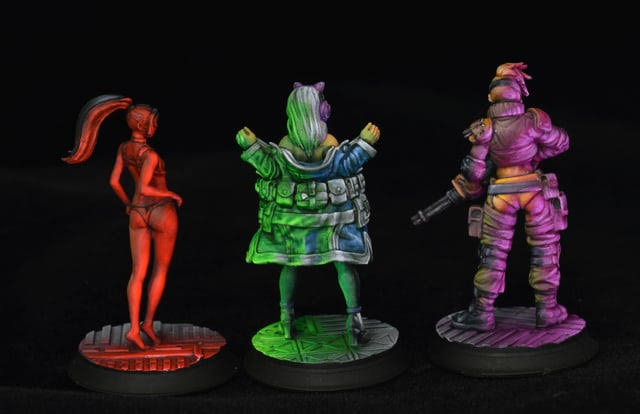
    <div class="font-bold text-[var(--accent-primary)]">// Figure 1: Directional Object Source Lighting (OSL) in Miniature Painting</div>
    <p class="font-sans text-[11px] leading-relaxed">
      Notice how light only radiates because 75% of the figures stay in deep shadow. On the left, hyper-saturated crimson up-lighting bathes the calves and floor grating. In the center, dual cyan and acid-green lighting catches the outer edges of the trenchcoat while the deep recesses recede into damp charcoal. On the right, warm magenta and gold zenithal lighting glazes the tactical armor folds.
    </p>
  </div>
</div>

---

## 2. The Five Artistic Pillars of Cohesive UI

### I. The "Mother Color" (Universal Shadow & Atmosphere)
In miniature painting, beginners shade by mixing pure black into their base color, which deadens the palette and turns surfaces muddy. Master painters mix a single **"Mother Color"**—often a deep indigo, dioxazine purple, mossy slate, or burnt umber—into *every* shadow and neutral across the entire piece. Even if a cloak is crimson and armor is gold, their deepest recesses share the same atmospheric undertone.

#### In Digital UI & TUIs
* **The Fatal Mistake:** Pure void black (`#000000`), pure sterile white (`#FFFFFF`), and untinted neutral grays (`#333333`, `#888888`) rarely exist in cohesive designs.
* **The Charm.land Trick:** Charm’s famous "pastel bubblegum" vibe works because every color shares a high-value, slightly warm/magenta undertone, and their dark backgrounds aren't pure void black—they are deep, warm plum-charcoals (`#1a1625` or `#221f2e`).
* **How to Apply It:** Tint your entire neutral scale toward a single temperature:
  * **Cyberpunk / Arcane Vibe:** Tint all grays, borders, and muted text with 5–10% violet or indigo (`#2A2438`, `#5C5470`).
  * **Industrial / Grimdark Vibe:** Tint all neutrals toward warm slate or desaturated olive/ochre (`#262925`, `#5A6058`).

---

### II. The 70 / 20 / 10 Value Hierarchy (Why Things Pop)
The #1 rule of Object Source Lighting (OSL) in miniature painting is simple: **nothing can glow unless the surrounding environment is painted darker than normal.** If an entire model is painted at 85% brightness, a 100% bright magic orb has no contrast range left to create the illusion of emitted light.

If every panel border, header, and status text in your app is bright white or saturated neon, nothing glows. Your UI looks like a miniature painted entirely with flat basecoats under harsh fluorescent kitchen lights.

```
┌────────────────────────────────────────────────────────────────────────┐
│  70% SHADOW (The Recesses)                                             │
│  Canvases, inactive borders, secondary metadata (30–40% brightness)    │
│  ┌──────────────────────────────────────────────────────────────────┐  │
│  │  20% MIDTONE (The Basecoat)                                      │  │
│  │  Readable copy, active container surfaces (75–85% soft off-white)│  │
│  │  ┌────────────────────────────────────────────────────────────┐  │  │
│  │  │ 10% FOCAL OSL (The Glow)                                   │  │  │
│  │  │ Reserve hyper-saturated accent for ONE element at a time!  │  │  │
│  │  └────────────────────────────────────────────────────────────┘  │  │
│  └──────────────────────────────────────────────────────────────────┘  │
└────────────────────────────────────────────────────────────────────────┘
```

#### Environmental Spill (Bleeding Light)
* **On the Web:** If you have a glowing neon button, don't give it a generic black drop-shadow (`rgba(0,0,0,0.5)`). Give it a colored atmospheric glow (`box-shadow: 0 0 20px rgba(255, 105, 180, 0.35)`) and tint the border of the card right next to it slightly pink.
* **In Lip Gloss (TUI):** You don't have CSS blur in a terminal, so you fake OSL with adjacent cell stepped gradients. If an active modal has a bright `#FF75B5` pink border, tint the background of the modal's title bar a deep, dark wine (`#3D1E30`) so the "light" from the border feels like it is illuminating the interior surface.

---

### III. Glazing Over Wireframes (Bridging Values)
Early or unpolished UIs often rely on drawing 4-sided borders around every single table cell, button, header pill, and panel. In dense interfaces—like terminal panes or monthly calendar grids—this creates an exhausting "Excel spreadsheet cage."

Harsh visual jumps create visual fatigue. When a bright `#FFFFFF` box sits directly on a `#000000` background with a `#FFFFFF` border, it looks jarring—like an unblended basecoat.

#### Bridge Your Values with a 4-Step Glaze Ramp
Create a 4-step "glaze" ramp in your theme struct for every semantic color:
1. **Abyss (`#16161E`):** Background canvas & recessed floor.
2. **Surface (`#1F2335`):** Elevated panel fill or subtle zebra row (+4–6% brightness step).
3. **MutedBorder (`#3B4261`):** Unfocused structure—acting as a whisper rather than a bright fence.
4. **Specular (`#BB9AF7` or `#FF75B5`):** Active focus, highlight text, and peak focal glow.

---

### IV. Non-Metallic Metal (NMM) & Directional Micro-Contrast
Non-Metallic Metal tricks the human eye into seeing gleaming steel or polished gold using flat matte paint. It works through **directional edge contrast**: placing a crisp, bright catch-light along the top edge where overhead light hits, right next to a deep shadow underneath.

Digital screens are flat rectangles, and terminals are even flatter character grids. To make components feel tactile, crisp, and "expensive" (like polished metal or beveled glass rather than muddy plastic), you need edge speculars:

* **On the Web:** Instead of a uniform `1px solid #333` border around a card, give the top border a crisp specular highlight (`border-top: 1px solid rgba(255,255,255,0.22)`) while keeping the side and bottom borders dark (`rgba(255,255,255,0.05)`). It immediately simulates overhead zenithal lighting hitting a 3D bevel.
* **In Lip Gloss (TUI):** You can style individual border sides in Lip Gloss! Try giving an active card or modal a brighter top/left border (`BorderTopForeground`, `BorderLeftForeground`) and a darker, shadowed bottom/right border (`BorderBottomForeground`, `BorderRightForeground`). That 1-cell shift in value tricks the human eye into seeing physical depth.

---

### V. Warm vs. Cool Temperature Tension
Most disappointing UIs are monochromatic or accidentally clash because they don't pair warm and cool roles deliberately. Contrast isn't just dark versus light; it is **warm versus cool**:

* **Cool Receding Canvas + Warm Advancing Focus:** This is why Charm’s aesthetic hits so hard. A terminal naturally feels cool, technical, and dark (deep indigo/slate background). When you drop warm pastel bubblegum pink (`#F25D94`), peach (`#FF9E64`), or creamy taro (`#CBA6F7`) onto that cool canvas, the warm elements physically pop forward toward the user.
* **The Rule of Opposites:**
  * **Cool Canvas (slate, deep navy, cyber-violet):** Make your active cursor, primary badges, and highlights warm (pastel coral, gold, bubblegum magenta).
  * **Warm Canvas (espresso, warm charcoal, gruvbox-style earthy darks):** Make your active highlights icy cool (mint green, electric cyan, frost blue).

<div class="my-6 rounded-xl overflow-hidden border border-[var(--border-subtle)] bg-[var(--surface-card)]">
  <img
    src="/images/aesthetic/neovim-catppuccin.png"
    alt="Neovim editor with pastel Catppuccin syntax on dark plum canvas"
    class="w-full object-cover max-h-[420px]"
  />
  <div class="p-4 text-xs font-mono text-[var(--text-muted)] border-t border-[var(--border-subtle)] space-y-1">
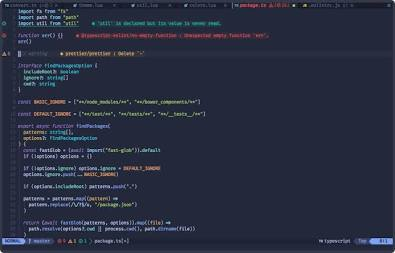
    <div class="font-bold text-[var(--accent-primary)]">// Figure 2: Cool Receding Canvas with Warm Advancing Accents</div>
    <p class="font-sans text-[11px] leading-relaxed">
      Notice how the background canvas is not black, but a deep indigo-charcoal undertone. The primary code is softened off-white, while warm peach, sky cyan, and mint tags pop forward without eye fatigue. Note the tactile keycap statusline pill at the bottom (<code class="text-[var(--accent-primary)]">NORMAL master package.ts</code>).
    </p>
  </div>
</div>

---

## 3. Two Signature Aesthetic Archetypes

When designing a product, commit early to the physical "materiality" of the interface. Two contrasting worlds demonstrate how these painting principles flex across different vibes:

### Archetype A: "Super Creamy" (Matte PBT Keycaps & Unix Ricing)
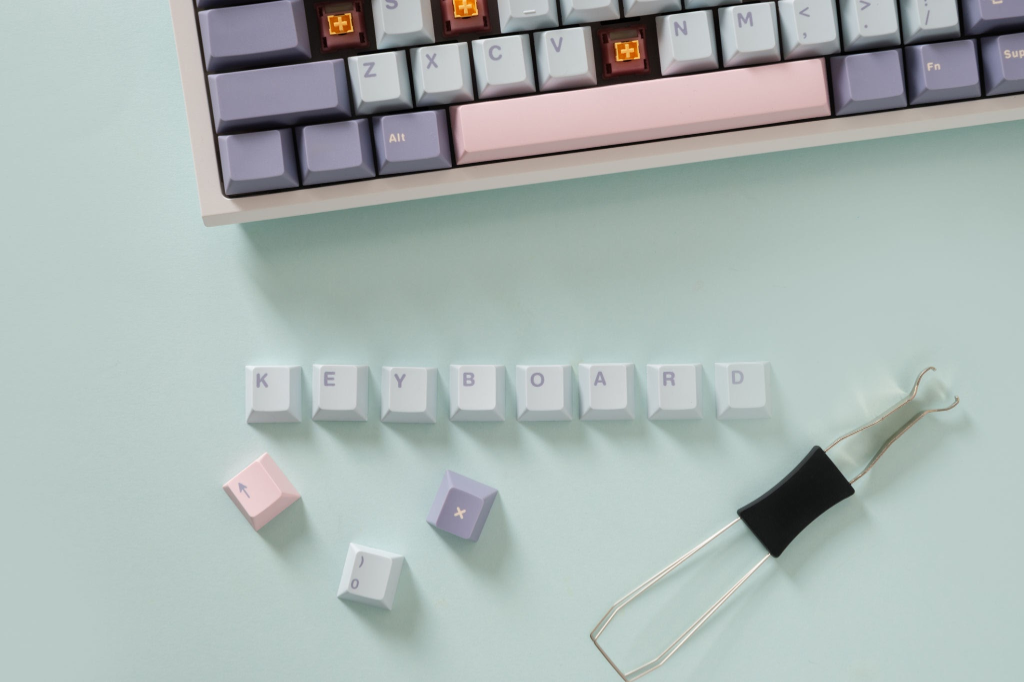
Inspired by custom mechanical keyboards (thick matte PBT keycaps like GMK Taro or Osume Matcha), lo-fi stationery, and curated Unix desktop "rices" (Catppuccin, Rosé Pine, Everforest, Kanagawa).

* **The Surface Physics:** Ultra-matte finish. Zero outer neon glow or blurry drop-shadows. It should feel like physical dye injected into soft-touch plastic or ink on heavy parchment.
* **The "Ice Yellow" Highlight Rule:** Miniature painters avoid chalky highlights by mixing warm ivory, pale sand, or ice yellow into their highlights instead of pure white. In a Creamy UI, even the brightest text is actually oat milk, almond, lavender milk, or warm parchment.
* **Compressed Value Range:** Raise the dark floor from pitch black into cozy espresso, moss, or plum, and pull the white ceiling down into cream. This eliminates eye strain during long sessions.
* **Double-Shot Keycap Contrast:** Instead of floating bright colored text on a dark background, style active tabs, status badges, and pills like physical keycaps: **solid pastel fills with dark espresso/canvas text molded inside them**, finished with a subtle, slightly darker bottom lip for tactile depth.

<div class="grid grid-cols-1 md:grid-cols-2 gap-4 my-6">
  <div class="rounded-xl overflow-hidden border border-[var(--border-subtle)] bg-[var(--surface-card)]">
    <img
      src="/images/aesthetic/pbt-keycaps.png"
      alt="Custom mechanical keyboard with thick matte PBT keycaps in pastel lavender and blush"
      class="w-full object-cover h-[240px]"
    />
    <div class="p-3 text-xs font-mono text-[var(--text-muted)] border-t border-[var(--border-subtle)]">
      <div class="font-bold text-[var(--accent-primary)]">// Figure 3: Physical Matte PBT Keycaps</div>
      <p class="font-sans text-[11px] mt-1">Soft lavender, blush pink, and almond cream. Physical dye, zero shiny gloss.</p>
    </div>
  </div>

  <div class="rounded-xl overflow-hidden border border-[var(--border-subtle)] bg-[var(--surface-card)]">
    <img
      src="/images/aesthetic/creamy-desktop-rice.png"
      alt="Creamy forest desktop rice with VS Code and htop tactile tabs"
      class="w-full object-cover h-[240px]"
    />
    <div class="p-3 text-xs font-mono text-[var(--text-muted)] border-t border-[var(--border-subtle)]">
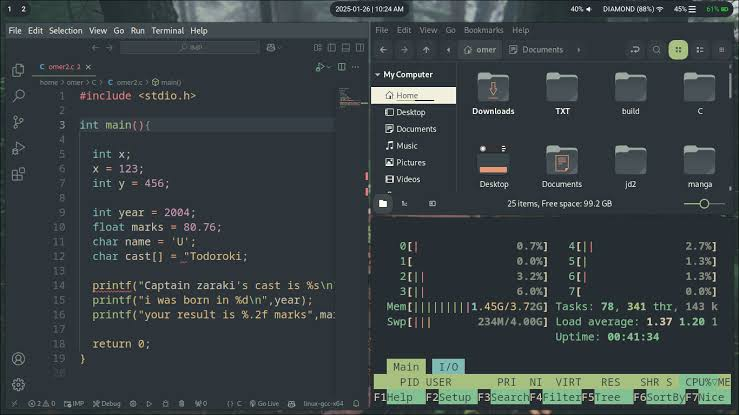
      <div class="font-bold text-[var(--accent-primary)]">// Figure 4: Creamy Desktop Rice in Practice</div>
      <p class="font-sans text-[11px] mt-1">Warm dark slate canvas, cream parchment text, and keycap function pills in htop.</p>
    </div>
  </div>
</div>

#### The Four Creamy Palettes
| Variety | Vibe & Inspiration | Canvas (Mother Color) | Surface Tiles | Primary Text (Cream) | Signature Keycap Accents |
| :--- | :--- | :--- | :--- | :--- | :--- |
| **1. Mocha** | *Warm Espresso & Taro Boba* | Deep Roasted Espresso-Indigo (`#1E1E2E`) | Matte Cocoa Slate (`#28283D`) | Lavender Milk (`#CDD6F4`) | Taro Mauve (`#CBA6F7`), Peach (`#FAB387`), Mint (`#A6E3A1`), Sky (`#89DCEB`) |
| **2. Matcha** | *Ceremonial Green & Bamboo* | Earthy Moss Charcoal (`#1E2326`) | River-Stone Slate (`#272E33`) | Steamed Oat (`#D3C6AA`) | Milky Matcha (`#A7C080`), Terracotta (`#E67E80`), Bamboo Gold (`#DBBC7F`), Seafoam (`#83C092`) |
| **3. Latte** | *Daylight Espresso & Milk* | Steamed Almond Milk (`#EFF1F5`) | Warm Crema Tile (`#E6E9EF`) | Roasted Espresso (`#4C4F69`) | Caramel (`#DF8E1D`), Berry Hibiscus (`#EA76CB`), Soft Lavender (`#7287FD`), Sage (`#40A02B`) |
| **4. Oat** | *Toasted Sesame & Linen* | Toasted Barley (`#22201E`) | Warm Clay (`#2E2B28`) | Unbleached Parchment (`#E5DFD5`) | Salted Caramel (`#D4A373`), Dusty Sage (`#A3B18A`), Clay Rose (`#D68C85`), Cream (`#EDEDE9`) |

---

### Archetype B: "Cyberpunk OSL" (Fluorescent Light-Spill & Tactical HUDs)
Inspired by fluorescent miniature Object Source Lighting, rainy Neo-Tokyo alleyways (Tokyo Night), and high-contrast tactical visors (*Cyberpunk 2077* HUD, Outrun synth-grids).

<div class="my-6 rounded-xl overflow-hidden border border-[var(--border-subtle)] bg-[var(--surface-card)]">
  <img
    src="/images/aesthetic/outrun-synthgrid.png"
    alt="Outrun synthwave wireframe mountain desktop rice with neon HUD windows"
    class="w-full object-cover max-h-[360px]"
  />
  <div class="p-4 text-xs font-mono text-[var(--text-muted)] border-t border-[var(--border-subtle)] space-y-1">
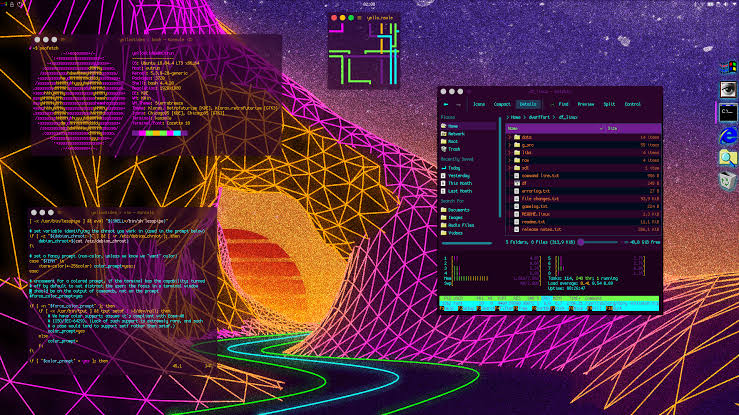
    <div class="font-bold text-[var(--accent-primary)]">// Figure 5: Cyberpunk OSL & Tactical Translucency</div>
    <p class="font-sans text-[11px] leading-relaxed">
      Wet asphalt reflecting neon in the dark. Deep purple-black sky background with vibrant orange/magenta wireframes. Translucent dark terminals let glowing telemetry data cut through with razor-sharp readability.
    </p>
  </div>
</div>

* **The Surface Physics:** Wet asphalt reflecting neon in the dark. 85% of the screen stays in deep, cold shadow so the remaining 15% can genuinely radiate light. Geometry is crisp, brutalist, and intentional—sharp corners, chamfered edges, or asymmetric single-side tactical bars rather than soft bubbles.
* **The 3-Layer Fluorescent OSL Rule:** Pure fluorescent paint looks dull if painted directly over black; painters always lay down a pure Titanium White core first, then glaze neon around the edges so it spills onto neighboring armor. In UI, every glowing focal element uses three layers:
  1. **White-Hot Core:** The active text or icon is nearly white, tinted with just a hint of the neon hue (`#D8FCFF` or `#FFE6FA`) for razor-sharp readability.
  2. **Saturated Neon Edge:** A crisp accent lip or top edge in pure electric pigment (`#00F0FF`, `#FF007F`, `#FF1E42`, `#00FF66`).
  3. **Environmental Light Spill (Halation):** A translucent, low-opacity glaze of that same hue washing across the dark interior surface of the active card, row, or calendar cell.

#### The Four Cyberpunk Palettes
| Variety | Vibe & Inspiration | Canvas (Wet Asphalt) | Panel Surface | White-Hot Core | Primary OSL Edge | Optical Tension Accent |
| :--- | :--- | :--- | :--- | :--- | :--- | :--- |
| **1. Over-Volt Blue** | *High-Voltage Arc Plasma* | Midnight Petrol (`#070A12`) | Etched Steel (`#101626`) | Ice-White Cyan (`#D8FCFF`) | Electric Arc Blue (`#00F0FF`) | High-Vis Volt Yellow (`#FCEE0A`) |
| **2. Yakuza Purple** | *Kamurocho Rain & Neon* | Bruised Aubergine (`#0D0714`) | Twilight Slate (`#170E24`) | Lilac White (`#FFE6FA`) | Ultraviolet Magenta (`#D900FF`) | Streetlight Gold (`#FFB800`) |
| **3. Red Dragon** | *Arasaka Tactical Visor* | Carbon Obsidian (`#0A0808`) | Warm Gunmetal (`#161112`) | Molten White (`#FFF0ED`) | Laser Ruby (`#FF1E42`) | Katana Steel Cyan (`#73F3FF`) |
| **4. Neon Green** | *Blackwall Bio-Matrix* | Phosphor Black (`#060D09`) | CRT Olive-Slate (`#0E1C14`) | White-Mint (`#E2FFEE`) | Acid Venom Green (`#00FF66`) | Radioactive Amber (`#FF9900`) |

---

## 4. Applied Critique: Lessons from Real Interfaces

### 1. Avoiding "Pill Traffic Jams" in Headers
When an interface stacks multiple rows of utility controls—weather widgets, workspace switchers, mode toggles, user profiles, view tabs, and category filters—giving every single control a bordered pill container creates severe visual clutter.
* **The Fix:** Distinguish between **Ambient Utilities** and **Interactive Filters**. Let ambient utilities (weather, secondary mode indicators, theme toggles, info icons) sit directly on the background canvas without borders in muted midtones. Reserve pill containers and active fills strictly for the filters and view switchers that actively reshape the data below.

### 2. Unifying Active Focus States
If a mode badge is bright cyan, the view switcher tab is electric purple, the active category filter has a coral-red ring, and the selected date has an orange square around a purple circle, the user's eye has no anchor.
* **The Fix:** Assign one consistent visual language for "Active UI Focus" across all navigation chrome, and reserve multi-color coding strictly for **data categories** (e.g., individual family members, project tags, or server statuses).

### 3. Eliminate "Double-Hats" on Selected Items
Highlighting a selected calendar cell or list item with *both* a brightly colored circular badge around the number *and* a contrasting brightly colored square border around the box creates visual friction.
* **The Creamy Approach:** Softly warm the background of the entire tile and turn the date number into a single, tactile sculpted keycap square.
* **The OSL Approach:** Give the top edge of the cell a crisp specular highlight that spills a subtle vertical gradient downward into the cell, letting the white-hot typography shine without an extra circle wrapper.

### 4. Crisp Micro-Indicators Over Blurry Dots
Tiny status dots with heavy outer glow blurs tend to bleed into an indistinct smudge on small screens or dense grids when three or four events stack together.
* **The Fix:** Replace blurry glowing dots with crisp, high-contrast micro-geometry—such as tiny horizontal pill bars, crisp unblurred pellets with dark separation gaps, or stepped miniature blocks.

### 5. Asymmetric Accent Lips for Content Cards
One of the most effective ways to tie a card or list row to a category without overwhelming the screen in color is the **OSL Left-Lip Card**: a deep, dark surface container featuring a thick, saturated left accent bar (`3px–4px` on web, `1 cell` thick border in TUI) whose hue softly glazes the interior background at 10–15% opacity, while keeping the interior text crisp and high-contrast.

---

## 5. Terminal (TUI) Physics & Ergonomics

When translating these aesthetics specifically into a monospace terminal grid (such as Go's Charm / Lip Gloss ecosystem), respect the physical constraints of character cells:

* **Demos vs. Reality:** Showcase demos look clean because they use curated 12-character strings at fixed window sizes. Real applications face long file paths, arbitrary UUIDs, and split-pane terminal resizing. Design layouts that dynamically adapt to viewport dimensions and gracefully truncate or clamp overflowing text before a single long line wraps and shatters horizontal column alignment.
* **Typographic Weight as Hierarchy:** Without variable font sizes, hierarchy relies entirely on **bolding**, **dimming/faint text**, **uppercase tracking** for small section headers, and **inverted background pill badges**.
* **Unmistakable Focus & Discoverability:** A user should know which pane holds keyboard focus within 100 milliseconds—dim inactive panes into the shadow ramp and brighten only the active pane's border or indicator glyph. Anchor the bottom of the viewport with a quiet, single-line keymap legend so navigation always feels discoverable without cluttering the workspace.